
Supports in FDM 3D printing: how to use them without ruining the piece
Orientation, overhang threshold, interface and distance from the model: a practical method to create stable, removable and less invasive FDM supports.
The best support is the one that the project avoids
In FDM 3D printing, each new section of material must rest on the one below it or cross a distance that the machine can print as a bridge. When a wall protrudes too much, a detail is born in the void or a bridge exceeds the profile's capacity, the slicer can add a temporary structure. The support makes the geometry possible, but consumes material, lengthens the print cycle, and leaves a different surface at the point of contact. For this reason it is not advisable to start by activating the automatic option. First, orientation, subdivision of the model and small changes to the CAD are evaluated. Only then is the necessary support generated. The goal is not to print with zero supports at all costs, but to use the minimum compatible with stability, function and finish.
Orient the piece starting from function and critical surfaces
Rotating the model simultaneously changes the amount of support, direction of the layers, footprint on the print bed, precision of the holes and quality of the visible faces. A bracket may require less support when placed on its side, but be weaker in the direction of the load. A face-down cosmetic surface may show interface marks even if printing is successful. Therefore identify three elements: areas that transmit the load, coupling dimensions and surfaces that must remain clean. Compare at least two orientations in the slicer preview and see not only the estimated grams, but also the total height, contact points, and direction of the lines. If complex geometry can be split along a hidden surface, two simple parts joined after printing can offer a better result than a single piece surrounded by supports.
Cantilever and bridge are not the same thing
An overhang maintains a connection to the previous wall, but each line moves outward. A bridge instead connects two supports crossing a free space. The slicer can treat them with specific speed, flow and ventilation. A short, well-cooled bridge can succeed without support; covering it entirely with support increases material and contact marks to finish. The well-known 45 degree rule is only an initial reference, not a universal limit. Material, layer height, extrusion width, cooling and geometry change the actual capacity. Prusa recommends calibrating bridges with dedicated specimens and considering speed and flow. A test that includes progressive cantilevers and bridges of different lengths is more useful than a value copied from an untested profile.
Choose between regular, snug and organic supports
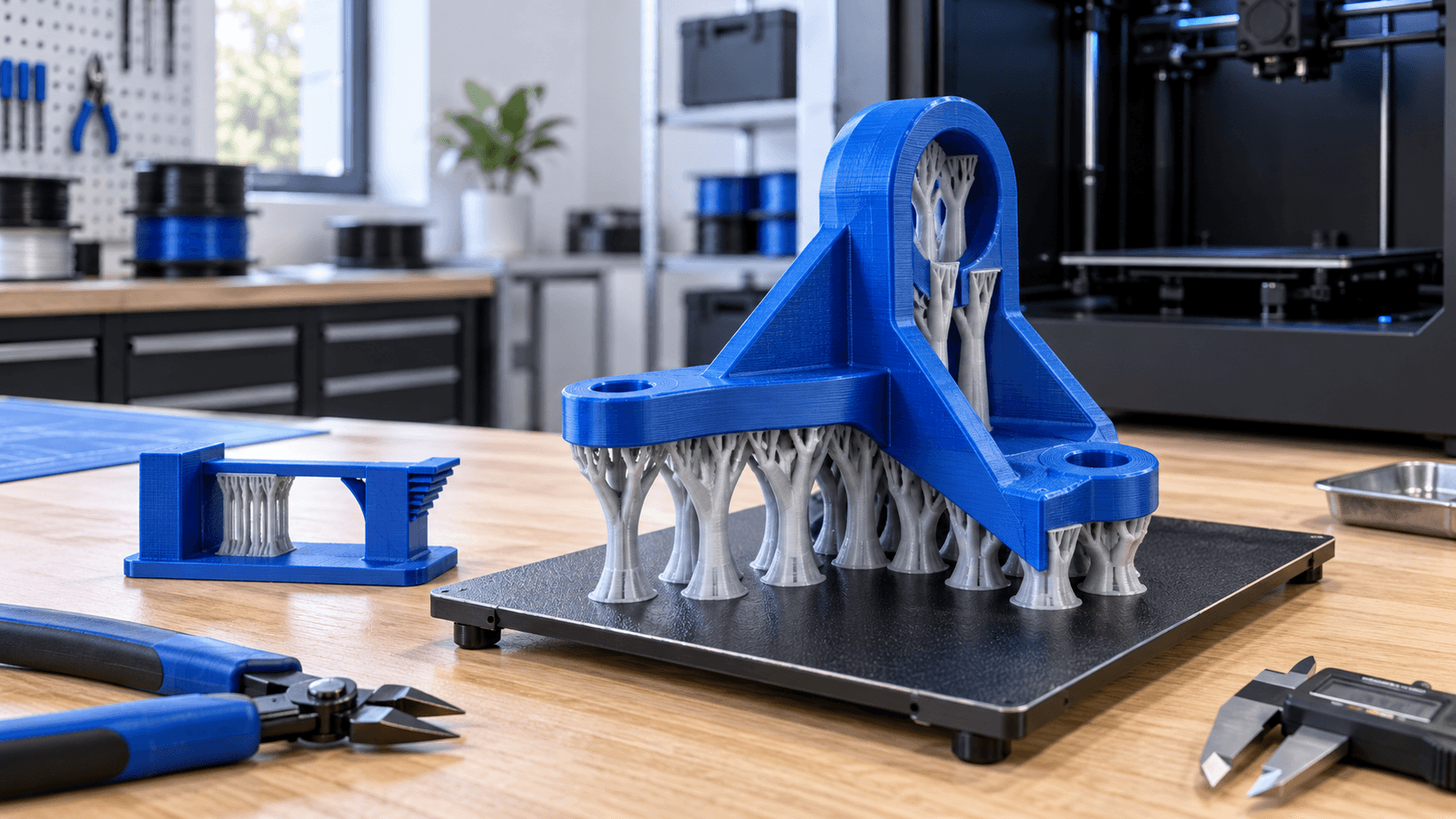
Grid or straight supports form regular columns and are suitable for large, relatively flat areas. A denser structure is stable, but takes longer and can become difficult to remove. Fitted supports follow the shape of the model more closely and reduce some unnecessary material. Organic supports, or tree-like in other slicers, branch from the base to the necessary points. They can be effective for miniatures, curved shapes, and distributed details because they limit contact and bypass the model. However, they are not automatically the best choice for every part: a large horizontal surface may require a uniform interface, while branches that are too thin or isolated may oscillate. Always check base, branch path and collision risk in the preview.
Limit generation to the areas that are really needed
The "build plate only" option prevents supports from starting above the component and reduces marks on already printed surfaces. However, it does not reach cavities or sheltered overhangs. The "everywhere" mode covers more cases, but can fill areas that are difficult to clear. Enforcers, blockers and painted supports allow local intervention: the support is forced under a critical detail and excluded where a bridge has already been validated. These tools do not replace layered verification. Scroll the preview from bottom to top and look for islands that start in the void, thin towers, branches without sufficient base, and trapped supports. Also observe the path of the nozzle: a tall, unstable element can be hit while moving. If needed, increase stability with a targeted base or brim, rather than densifying the entire volume.
Adjust interface and distances as a compromise
The last lines of the support form the interface under the model. The more continuous and close it is, the more it supports the lower face; at the same time it can stick too much and make removal aggressive. A larger distance makes separation easier, but leaves more room for the filament to flex and worsens the finish. The lateral separation also protects the walls: if it is excessive it does not support the edge, if it is minimal it can weld the structure to the piece. There is no valid Z distance for every combination. It depends on layer height, material, temperature and machine precision. Start from the official printer profile and modify only one variable at a time. If the face is sagging but the support removes well, evaluate the interface and distance; if it breaks during printing, check the base, pattern, speed and density of the structure instead. A bad surface isn't always corrected by adding more support.
Different materials and soluble supports require control
With a multi-material machine it is possible to print only the interface with a different material or make the entire support in PVA, BVOH or another compatible material. The dedicated interface reduces the consumption of special material and can allow closer contact. However, compatible temperatures, good adhesion between materials, reliable tool change and correct purge volumes are required. Soluble filaments are often hygroscopic and should be stored according to the manufacturer's directions. Dissolution and disposal also depend on the material, additives and local rules: "soluble" does not mean that any residue can be eliminated without verification. For dimensional components, a small interface test is more economical than a complete print that fails after many hours.
Remove supports without turning the finish into a risk
Let the piece cool and follow the material's directions. Start from the most accessible external structures, then use flush cut nippers or dedicated pliers at stubborn attachment points. Don't twist a thin wall to free an internal branch. The fragments can be sharp and jump during detachment: protect your eyes and orient the tool and piece away from the body. Finally, check the part with grazing light. Record marked areas, hard-to-reach supports and altered dimensions, then correct CAD, orientation or profile. ADIVO can check the printability of the model, prepare supports and orientation and produce an FDM sample before the series. Send file, material, quantity, critical surfaces and intended use: this is the information necessary to choose the correct compromise between stability, finish and machine time.