
Stringing in 3D printing: eliminating threads and cobwebs without overcorrecting
Thin wires between printed parts? An orderly diagnosis distinguishes temperature, retraction, wet filament, dirty nozzle and slicer movements.
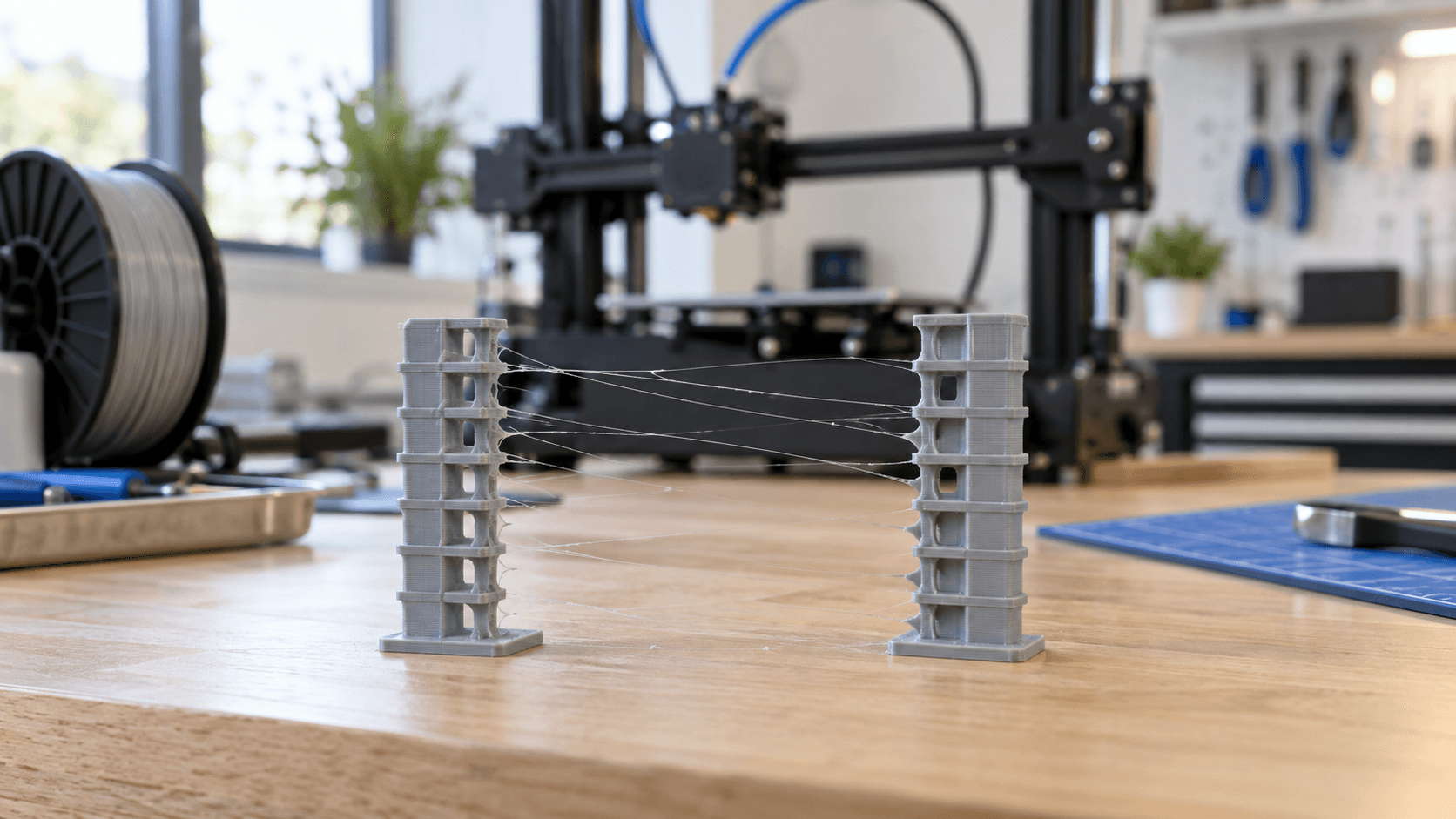
What is stringing in 3D printing
Stringing is formed by thin threads left between two areas of the model during an idle movement of the head. The extruder has stopped depositing a wall, but a small amount of polymer continues to come out of the tip. The material is dragged to the next point and creates a web. Some very light threads may only be an aesthetic defect; thick accumulations, drops or ruined surfaces indicate a problem that needs to be diagnosed. The temptation is to immediately increase the retraction. It often worsens the result: excessive values can stress the filament, wear it on the gears or drag hot material into an unsuitable area of the hotend. The most reliable procedure starts with the correct profile, checks the material and temperature, then changes one variable at a time.
First check: profile, material and machine
Restore an official preset compatible with printer, nozzle diameter and material. A profile created for PLA, applied without control to PETG or TPU, may use inappropriate temperature and retraction. The extruder configuration also matters: a long Bowden path and a direct drive do not necessarily require the same retraction distance. Don't copy a value found online without checking the model and architecture. Then check the spool. Filament that has absorbed moisture can produce uneven surfaces, bubbles, small popping sounds and increased stringing. Some materials, including polyamide, PVA and TPU, require more attention to storage than many PLAs. Before drying, always consult the manufacturer's data sheet: temperature and time depend on the polymer, while excessive heat can deform the spool or filament. If possible, compare the same print to a known, well-preserved spool.
Temperature: reduce it methodically
Too high a temperature lowers the viscosity of the material and favors leakage during travel. Prusa suggests, as a test on its ecosystem, gradual reductions of 5-10 °C. It's not a universal rule: stay within the range indicated by the filament manufacturer and observe adhesion between layers, finish and flow rate. Going too low can cause underextrusion or insufficient bonding of layers. Print a small temperature tower or two towers spaced apart using the same test G-code. Only the temperature changes, keeping speed, retraction, cooling and material the same. Look for the lowest point that limits the threads without creating dull, brittle or incomplete walls. If the defect does not change, the root cause is probably elsewhere.
Retraction: distance and speed should not be maximized
Retraction pulls the filament back before idling, then brings it back under pressure when extrusion begins again. Two main parameters are distance and speed. Too little distance can leave pressure in the nozzle; too much can increase wear and instability. A high speed can reduce oozing, but if it exceeds what the motor and filament tolerate it can cause missing steps or marking the material. Start from the machine preset. Run a retraction tower by changing small intervals, only one variable per trial. Evaluate threads, seams, empty gaps and extruder noise together. The best value is not the one with zero threads at all costs, but the one that reduces the defect while maintaining regular extrusion. With TPU and other flexibles, deformation in the path makes calibration more delicate. The Prusa guide notes that these materials may require specific adjustments; However, use manufacturer profiles as a basis. Increasing distance and speed together without controlled testing makes it difficult to understand which modification worked.
Dirty nozzle, debris and hotend
External debris may stick to the piece and appear to be stringing. Inspect nozzle and heater block when the printer is cold. Follow specific manual for cleaning: hotend and print bed can cause burns, wire brushes near heater and thermistor wires can create short circuits, and some coated nozzles require dedicated methods. If the problem appears after maintenance or replacement of components, check assembly according to the manufacturer's instructions. A poorly assembled hotend, abnormal heat dissipation, or frictional filament path can alter the retraction response. Do not dismantle hot parts and do not improvise tightening torques.
Travel and geometry: reduce visible crossings
The slicer can limit movements that cross external perimeters. In PrusaSlicer, “Avoid crossing perimeters” optimizes travel to reduce crossings over visible areas. Similar options exist in other slicers, with different names and consequences. Longer routes may increase time; always check preview and estimate. Printing objects sequentially can reduce threads between pieces, but introduces risk of collision with already completed components. Use it only if the head's free volume, height and distance are compatible; respect slicer warnings. For many jobs it is safer to arrange the pieces to shorten travel or print one sample at a time.
Six-test diagnostic procedure
1. Reset correct preset for machine, nozzle and filament. 2. Clean outside of nozzle following manual and check for residue. 3. Compare a known dry spool to the suspect one. 4. Test two or three temperatures, staying within the manufacturer's range. 5. Retraction calibration: first change distance, then speed. 6. Check travel preview and reduce external crossings. Photograph each specimen and note profile, temperature, distance, speed and spool. Without a record, two almost identical tests become easy to confuse. Finally, repeat the test on the real component: a small tower does not always reproduce the durability, geometry and thermal accumulation of a long print.
Fix without hiding the problem
Removing threads at the end of the print does not correct the cause. Cutter, hot air or flame can damage the surface and create risks. If finishing is needed, use tools suitable for the material, PPE and controlled procedure; avoid open flames. First stabilize the process, then evaluate post-processing. Do you have a piece with threads, drops or uneven edges? [Contact ADIVO](https://adivo.it/en/contatti) with photos, 3D files, material and profile used: we can evaluate geometry, slicer and comparative test before production.