
Layer height in 3D printing: quality, time and error-free surfaces
Thin layers don't always mean better parts. Discover how to choose the right height by evaluating geometry, nozzle, time and the part's function.
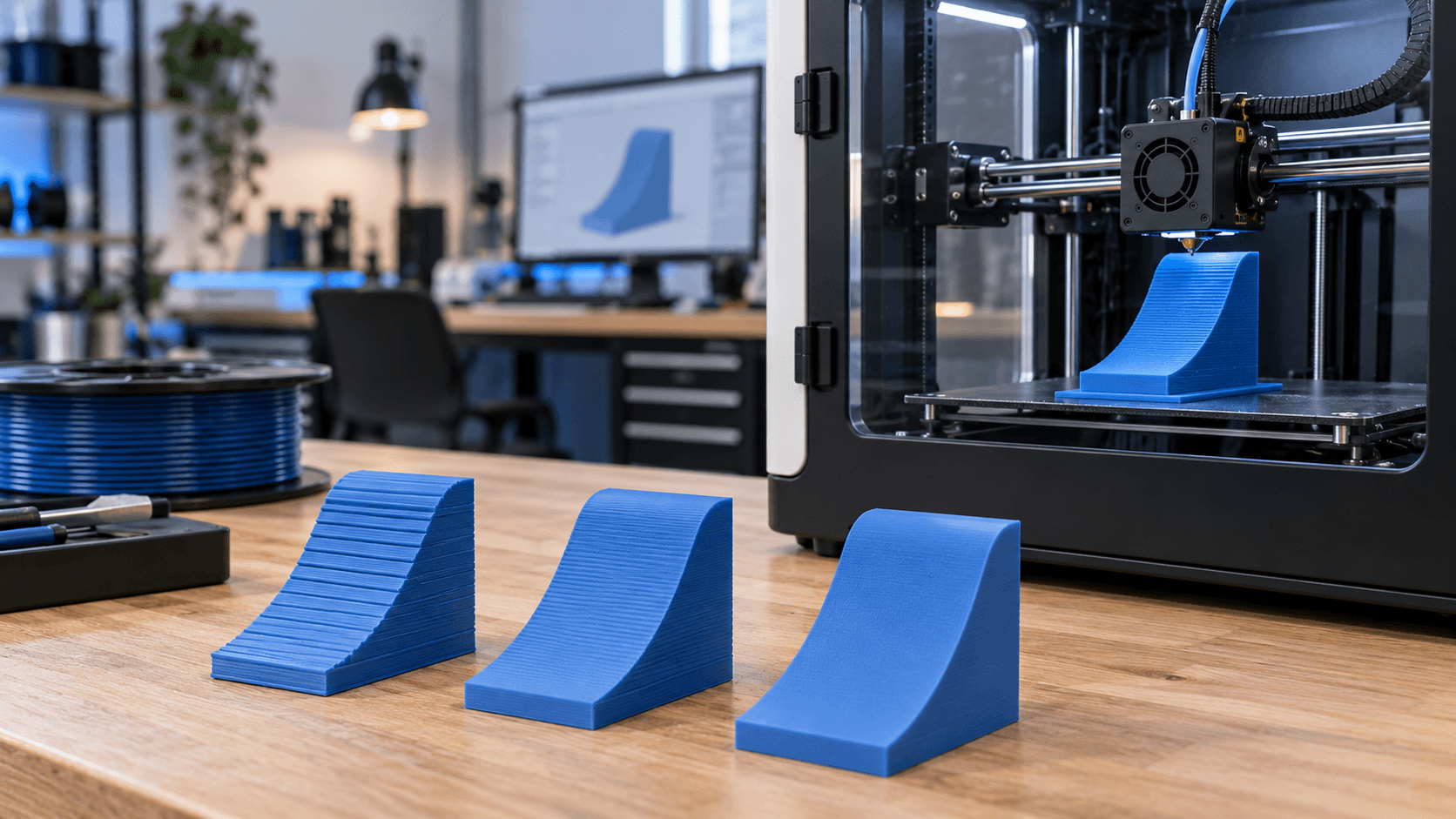
What really changes with layer height
Layer height is the vertical thickness of each layer generated by the slicer. Reducing it increases the number of layers needed to complete the model; increasing it reduces that number. The most visible consequence is on inclined and curved surfaces: thin layers form smaller steps, while tall layers make the terracing effect more obvious. This parameter concerns mainly resolution along the Z axis. It doesn't automatically make holes, text or details developed on the XY plane sharper. In those areas nozzle diameter, extrusion width, orientation, kinematics and model quality also count. Setting minimum layers to correct a lateral limit can therefore increase time without solving the defect. Effective choice starts from function: an aesthetic model with domes and fillets needs a different compromise than a hidden rectangular bracket. There's no best value for every part.
0.12, 0.20 or 0.28 mm: examples, not universal rules
With a 0.4 mm nozzle, many official profiles propose values close to 0.12 mm for greater detail, 0.20 mm for general use and 0.28 mm for faster operations. They're useful examples only if present in your machine's, material's and nozzle's preset. Printers, hotends and slicers apply different limits. A thin layer enhances gentle slopes, small fillets and curved upper surfaces. It increases the number of passes but can make some Z movement or flow irregularities more sensitive. A medium layer often offers a good balance for dimensional prototypes and common components. A tall layer reduces time on simple geometries, but makes steps more visible and changes the extrusion cross-section. Prusa indicates that height must stay below the nozzle diameter and suggests, as a reference for its slicer, not exceeding about 80% of the diameter. This indication doesn't authorise forcing values outside another machine's profile. Always use the manufacturer's limits and presets.
Why time doesn't drop perfectly proportionally
Doubling layer height halves the number of layers in theory, but not necessarily the total time. First layer, movements, accelerations, cooling, walls, top and bottom, supports and volumetric flow rate remain real constraints. On small parts, the machine can spend a lot of time accelerating and decelerating; on wide sections, it can be limited by the amount of material the hotend can melt. Taller layers require a larger extrusion cross-section. With equal width and speed, volumetric flow rate increases. The slicer can therefore reduce speed to respect the material or hotend limit. To understand the real benefit, compare estimated time and the flow rate view after slicing, not just the number entered in the layer height field. Top and bottom also deserve attention. If you set only a fixed number of layers, changing their height changes the total thickness of the solid surfaces. Where available, check the minimum thickness in millimetres as well as the layer count.
Geometry and orientation come before the value
Nearly vertical surfaces change little going from medium to thin layers. Low slopes, domes and upward-facing curves show the step more easily instead. A part can therefore have areas that benefit greatly from detail and long stretches that gain no visible advantage. Orientation changes the problem. Rotating the model can reduce steps on an important face, but can add supports, worsen tolerances or orient the layers unfavourably with respect to loads. Evaluate aesthetics, functional contacts, force direction and support removal together. A poorly defined mesh doesn't gain real detail with thinner layers. If the file contains large faces or already faceted curves, the slicer reproduces that limit. Always check the model and preview before attributing the defect to the printer.
The first layer is a separate setting
First layer height can differ from the rest of the part. Profiles often use a more tolerant first layer to favour continuity and bed adhesion, even when the model is printed with fine layers. Don't copy isolated values without considering levelling, Z offset, surface and the machine's procedure. Changing the first layer can require a new calibration check. Too much compression creates protruding edges and flattened lines; too little leaves gaps and insufficient adhesion. Before optimising upper detail, make sure the base is uniform and compliant with the manufacturer's instructions.
Thin layers don't guarantee greater strength
Strength depends on material, temperature, flow rate, orientation, walls, geometry, interlayer adhesion and use conditions. More layers mean more interfaces and more deposition cycles; they don't automatically equal a stronger part. On the contrary, layers too tall with respect to nozzle and process can reduce useful overlap between lines. For a functional component, compare printed samples with controlled profiles and representative loads. A smooth look doesn't demonstrate mechanical performance. Critical applications require test criteria and specific evaluations, not a rule derived from a single specimen.
Variable height: detail only where needed
PrusaSlicer and Cura include functions to vary height according to geometry. The slicer can use thin layers on curves or the most sensitive slopes and tall layers on vertical or simple areas. The goal is to keep detail where it's visible without applying the time cost to the whole model. The function isn't automatic quality assurance. Check transitions, thin walls, top and bottom, supports and profile compatibility. Prusa also reminds that the chosen profile changes other settings too, such as extrusion width; it's advisable to start from a profile close to the height used for most of the part.
Practical procedure before starting the print
1. Select the official preset for printer, nozzle and material. 2. Identify aesthetic surfaces, functional dimensions and force direction. 3. Compare two or three heights supported by the same preset. 4. Check preview, layer count, flow rate, supports and estimated time. 5. Check total thickness of upper and lower walls. 6. Use variable height only after examining transitions. 7. Print a representative sample when quality or function matter. The best layer height is the one that meets visual and functional requirements with controlled time and risk. Thinner layers serve when the geometry values them; taller layers work when profile, nozzle and flow rate support them. Need to choose a profile for a prototype or small series? [Contact ADIVO](https://adivo.it/en/contatti) specifying file, material, dimensions and important surfaces: we can help you evaluate orientation, layer height and the most suitable process.